
YouTube transcripts
Extract YouTube transcripts in your browser
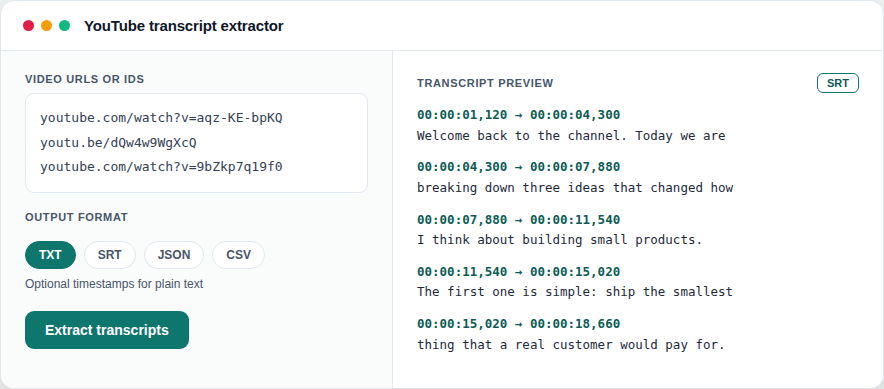
Paste video URLs or upload a list, choose TXT/SRT/JSON/CSV, and download captions. Offline paste fallback if fetch is unavailable.
1 credit when the job succeeds · failed runs are free
Why teams use it
Built to remove busywork
- Paste URLs or upload video_list.txt
- Output formats: TXT, SRT, JSON, CSV
- Optional timestamps for plain text
- Paste-transcript fallback when network fetch fails
- 1 credit on first transcript download per job
How it works
From file to finished in minutes
-
01
Add videos
Paste YouTube URLs/IDs or upload a text list.
-
02
Choose format
Pick TXT, SRT, JSON, or CSV and run the job.
-
03
Download
First download costs 1 credit; re-downloads are free for 7 days.
Built for
Creators, researchers, and marketers who need captions as text.
Questions
Good to know
- Do videos need captions?
- Yes for live fetch - the tool uses available YouTube captions/transcripts.
- What if YouTube is unreachable?
- Use the paste-transcript fallback to format text you already have.
- Which formats can I download?
- TXT, SRT, JSON, and CSV. Optional timestamps are available for plain text.
- Do Shorts URLs work?
- Yes - watch URLs, Shorts, embed/live paths, and bare video IDs are accepted.
- When am I charged?
- 1 credit on the first transcript download per job. The job summary JSON is free.
From the guides
Read next
Ready to run it?
Shared credits · no software to install · failed jobs free